My program isn't listed
You can move from any program that can save a report as CSV or Excel.
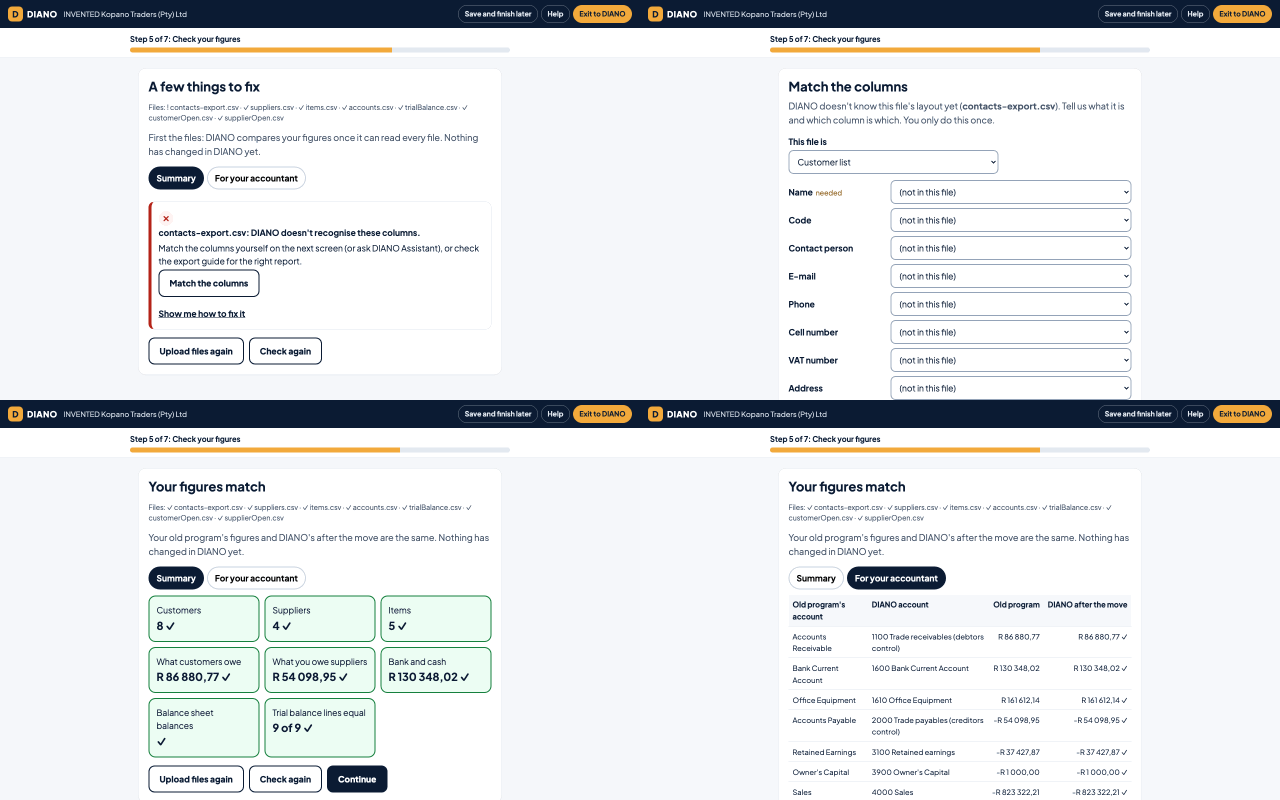
Which files DIANO needs
Your trial balance on the day before your start date. A trial balance lists every account with its balance on one day.
Your unpaid customer invoices on the same day, one line per invoice.
Your unpaid supplier invoices on the same day, if you owe suppliers money.
Your customer list, supplier list and item list, if your program has them.
Where to find them
Look in your program's Reports menu for Trial Balance, Aged Receivables (or Aged Debtors) and Aged Payables (or Aged Creditors). Lists are often under Export, or in the list itself under a button with three dots.
Always choose CSV or Excel, never PDF. DIANO can't read a PDF.
Matching the columns
If DIANO doesn't know your program's columns, it asks you once which column is which. You see an example from each column to help you choose.
If DIANO Assistant is switched on, it can suggest the matches. You still check each one.
Or use DIANO's templates
Download DIANO's Excel templates, copy your figures in, and upload them. Each template has an example row and an Instructions tab.